
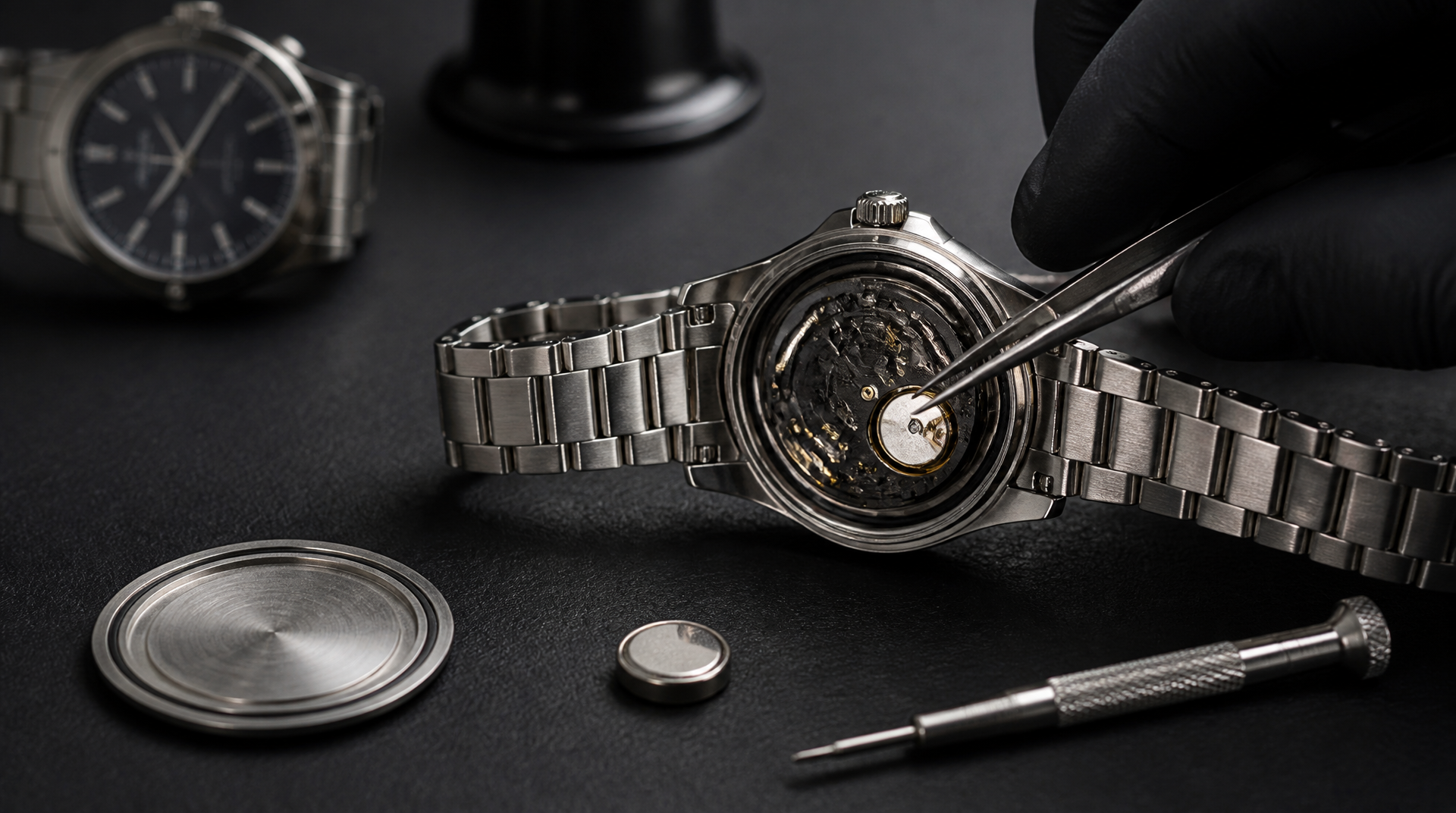
You can replace a Citizen watch battery yourself on most quartz and Eco-Drive models with a few inexpensive tools and a steady hand. The core job is the same across the lineup: open the case, swap the dead cell or capacitor for a fresh one, and close it back up securely. But your next move depends on one thing you can check right now. If the case back says “Diver’s 200m” (or any ISO‑labeled diver), the watch is still under warranty, or you’re holding a vintage Eco-Drive made before about 2010, stop. Opening those watches without a factory pressure test or brittle-movement handling plan ruins water resistance or cracks irreplaceable plastic spacers.
For everything else—field watches, WR100 or less daily wearers, and modern Eco-Drive models with a solid screw ring—this guide gets it done.
Know Your Citizen: Quartz vs. Eco-Drive
Mixing up the two systems wastes a battery or, worse, damages the charging circuit. Identify your watch before you buy anything.
- Quartz models run on a disposable silver-oxide button cell (SR‑code, such as SR626SW or SR920SW). The dead‑battery signal is unmistakable: the second hand jumps in 2‑second increments and the watch eventually stops.
- Eco-Drive models use a rechargeable titanium lithium‑ion capacitor (usually marked MT920, MT621, or a similar Citizen part number) that stores energy from light. They don’t take a standard battery. A worn capacitor shows up as a watch that won’t hold a charge overnight even after a full day of direct sunlight.
Where people guess wrong. If your Eco-Drive has been in a dark drawer for months, it may just need a two‑day light charge, not a capacitor swap. Before buying a capacitor, place the watch face‑up under a bright LED desk lamp (or indirect sun) for 48 hours. If the second hand starts moving normally, the capacitor is still serviceable. You just skip a replacement.
What You’ll Need Before Opening the Case
Opening a Citizen without the right opener leaves permanent marks on the case back and can warp the sealing gasket. Set up a clean workspace with a soft mat and good light. Photograph the movement before removing anything.
Tools you’ll use:
- A sticky rubber ball for press‑fit screw‑down backs (common on many Eco‑Drive models).
- A case knife for snap‑on backs on thin quartz dress watches.
- An adjustable 3‑pin case back wrench for notched screw‑down backs.
- Plastic‑tipped tweezers (metal tweezers can short the cell or scratch the movement).
- A small Phillips or flat‑head screwdriver if your movement uses a battery strap.
- A microfiber cloth and a blower.
- Silicone grease (optional) for the case back gasket.
Battery and capacitor reference. Always confirm the number printed on the old cell or on the movement holder plastic. The table below gives common starting points, but production‑year changes can shift the spec.
| Watch Example | Type | Common Power Cell |
|---|---|---|
| Citizen Q&Q analog quartz | Quartz | SR626SW |
| Citizen BM8180‑03E “Eco‑Drive” | Eco-Drive | MT920 capacitor |
| Citizen Chandler quartz field watch | Quartz | SR920SW |
| Citizen EO2020‑08E Eco‑Drive dive watch | Eco-Drive | MT621 capacitor |
The Replacement Procedure
Work on a non‑conductive surface. If the watch has a screw‑down crown, unscrew it fully and pull the crown to the time‑setting position while you work; this prevents accidental stem pressure.
1. Remove the case back
- Rubber ball back: Press the ball firmly into the grooves and twist counterclockwise. It will loosen in a turn or two.
- Notched back: Fit the wrench pins into the notches and turn. If you feel resistance after a quarter turn but the back doesn’t lift, stop. A stuck diver back needs more torque than a home opener can safely deliver. Take it to a watchmaker before the notches get stripped.
- Snap‑on back: Locate the small lip (often near the lugs), insert the case knife blade, and twist gently until it pops. Keep your off hand clear.
2. Expose the old cell or capacitor
On Eco‑Drive watches, you’ll see a thin plastic insulating spacer surrounding the capacitor. Remove it with plastic tweezers and set it aside. Here’s the first decision branch: look at the insulator ring carefully. If it’s cracked, melted, or missing, stop. You cannot substitute tape or generic washers—an imperfect insulator will short the capacitor against the movement plate. Order the exact factory spacer ring for your Citizen caliber before you swap the capacitor; putting it back together without a sound insulator risks immediate electrical failure. If the ring is intact, proceed.
The capacitor may be held by a small metal plate and a screw. Remove the screw, lift the plate, and note the orientation of the old capacitor (top side usually marked). On quartz watches, you’ll see a battery held by a tension arm or a sliding lock that you can release gently without bending it.
3. Remove the old cell
Use plastic tweezers. Lift the cell straight up. The side with the writing is the negative side and usually faces up in Citizen quartz movements. Wipe the contact pads in the movement with a dry microfiber cloth or pegwood; even invisible oxidation here is a common reason a new battery won’t start.
4. Install the new cell
- Quartz: Rest the new battery in the holder, printed side up. Secure the tension arm. If there’s a battery strap, tighten the screw only until the battery is held firmly without being crushed.
- Eco‑Drive: Seat the new capacitor in its cavity, re‑position the clean insulator ring around it, replace the metal retaining plate, and tighten the screw until the capacitor doesn’t wiggle. Over‑tightening cracks the movement spacer.
Critical checkpoint before closing: Push the crown back to the resting position. On many Citizen quartz calibers, pulling the crown out disengages the setting lever in a way that can jam against the stem when you press the case back on. Return the crown to the fully-in position now, and the movement will seat correctly.
5. Inspect the gasket and close the case
The case back gasket is the only thing standing between your movement and moisture. Run your finger around it. If it’s flattened, cracked, or stretched, replace it with a factory Citizen gasket for your case reference number. A generic O-ring that looks close enough in diameter but is 0.1 mm too thick will prevent the case back from seating flush.
Lightly coat the gasket with silicone grease—just enough to make it shine, not a heavy smear—and seat it in its groove. For screw‑down backs, press the back flat against the case and turn counterclockwise first until you feel the threads drop into place, then tighten clockwise. This prevents cross‑threading. For snap‑on backs, align the lip with the stem notch and press evenly with a case press or the flat of your thumb until you hear a crisp snap all around.
Where People Get Stuck
The watch doesn’t start after a new battery. This is the most common failure point, and it’s rarely the battery’s fault. First, check that the tension arm is actually making contact with the top of the cell—a bent arm that hovers 0.5 mm above the battery surface won’t complete the circuit. Second, perform an AC reset: on many Citizen quartz movements, touching the AC contact point (often a small hole labeled “AC” on the movement spacer) to the positive battery terminal with metal tweezers for one second forces the integrated circuit to restart. If neither works, the coil or circuit may have been damaged during handling.
The second hand moves but the watch loses time. This points to a partial short or a wrong battery thickness. A cell that’s 0.1 mm too thin will make intermittent contact as the watch moves on your wrist. Confirm the old battery code against the new one—Citizen movements are sensitive to cell height, and an SR621SW is not interchangeable with an SR626SW despite fitting the holder.
Eco‑Drive capacitor won’t charge after replacement. A new capacitor that reads zero volts after 24 hours under light often has a damaged insulator ring underneath it. Remove the capacitor and check that the plastic ring is fully seated and not pinched between the capacitor can and the movement plate. Even a hairline crack in that ring creates a permanent short to ground.
Success Check: How to Know the Job Is Done Right
Before you strap the watch back on, run through three quick checks:
1. Immediate start: The second hand should begin moving within a few seconds of installing the new cell. On Eco‑Drive models, expose the watch to bright light for one minute and confirm the second hand ticks in one‑second increments (not two‑second jumps, which indicate a low‑charge state).
2. Crown function: Pull the crown to each position and confirm the hands set smoothly without grinding or slipping. A crown that feels gritty after reassembly usually means the stem wasn’t fully seated before the case back went on.
3. Button and pusher check: If your watch has chronograph pushers, press each one. A pusher that sticks or fails to click means the movement shifted slightly during case back installation and the pusher lever is misaligned with the case tube.
If all three checks pass, the replacement is complete. If the watch fails any of them, reopen the case and inspect the stem alignment and movement seating before closing it again.
When to Hand It to a Professional
Some Citizen watches are built to resist amateur intervention, and that’s by design. Take the watch to an authorized Citizen service center if:
–
Explore This Topic
- Back to Citizen
- Back to Citizen Battery
Related guides in this cluster:
- Citizen Eco-Drive Complete Guide: Setting Time, Battery Life & Care
- Citizen Watches: The Complete Brand Guide — Eco-Drive, Promaster & Japanese Innovation
- How to Replace a Bulova Watch Battery: Complete Guide for All Models

The We Know Watches editorial team brings together over 40 years of combined watch collecting, trading, and repair experience. Our editors have owned and handled watches from every major brand — from entry-level Seiko 5s to Rolex, Omega, Patek Philippe, and independent Swiss watchmakers. We’ve bought and sold at auction, worked with authorized dealers, visited manufacturing facilities in Switzerland and Japan, and serviced hundreds of movements ranging from the Seiko 7S26 to the Longines L888. Every guide and review we publish is based on hands-on experience, original research, and consultation with professional watchmakers. We do not accept payment for reviews, and we clearly disclose when we use affiliate links.