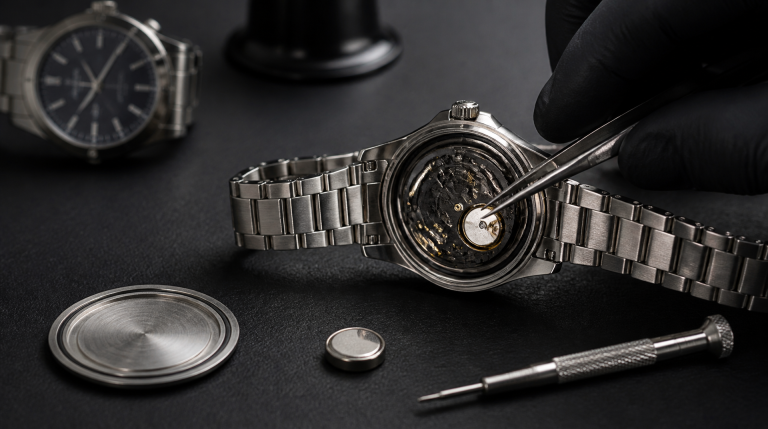

Getting the correct time on a Citizen Eco-Drive is simple once you know the crown positions and the no‑set zone for the date. As for the “battery,” it’s a rechargeable titanium lithium‑ion capacitor that typically lasts 10–20 years; when it finally fails, you replace it with a specific Citizen rechargeable cell—not a coin battery—and opening the case back requires careful steps to preserve water resistance. This guide covers setting analog, radio-controlled, and digital Eco-Drive models, diagnosing a dead capacitor, and a safe DIY replacement flow with clear stop points so you know when a watchmaker is the smarter call.
Signs Your Eco-Drive Capacitor Is Failing – And When to Replace
A Citizen Eco-Drive doesn’t use a disposable battery, but the rechargeable capacitor eventually degrades. Most owners notice the second hand jumping in two‑second steps (the end‑of‑life, or EOL, indicator) while the time stays accurate. Before opening the watch, run this simple diagnostic:
- Two‑second step after a full charge test: Charge the watch under bright indirect light—8–12 hours under a cool LED desk lamp, or 3–4 hours outdoors on an overcast day. If the second hand returns to one‑second stepping, the capacitor is still functional and just needed a charge. If it still jumps after a full day under strong light, the capacitor can’t hold a charge.
- Sudden complete stop: The watch runs for hours or overnight after a full charge, then dies abruptly. The power reserve has collapsed—classic dead cell.
- Blank digital display on a hybrid model: Many dual‑display Eco‑Drive watches have a separate small button cell for the digital panel. Replacing the main capacitor won’t revive a blank digital screen; you need to swap that small battery (often a CR2016 or CR2025).
- Time drifts but second hand ticks normally: This is rarely a capacitor problem. After a successful charge, if the watch gains or loses more than 15 seconds a month (quartz spec is usually ±15 sec/month), the electronic module or quartz oscillator may be faulty. No amount of capacitor swapping will fix it—send it to a service center.
The table below summarizes common symptoms and next actions.
| Symptom | Likely Cause | Next Action |
|---|---|---|
| Second hand jumps in two‑second steps | Low charge (EOL) | Charge fully; if it returns to 1‑sec stepping, capacitor is okay |
| Two‑second step remains after 12‑hour charge | Dead capacitor | Replace capacitor with correct Citizen part |
| Watch runs down in hours despite full charge | Degraded capacitor | Replace capacitor |
| Movement runs fine but digital display is blank | Dead digital battery | Replace the small button cell (CR2016/CR2025); check manual |
| Second hand stops completely after a drop/bump | Mechanical shock damage | Do not open; take to a watchmaker |
| Watch stops minutes after a “full charge” in direct sun on a hot dashboard | Overheat damage | Potential crystal gasket warp or circuit stress; professional inspection required |
One critical branch often overlooked: if your watch absorbs a full charge and the second hand strides normally, yet the hands freeze or skip when you tilt the watch, you may have a loose dial foot or a displaced movement holder, not a bad capacitor. That’s a mechanical issue requiring a watchmaker. Likewise, if the capacitor leaks (you’ll see a dark, oily stain around the cell), do not proceed with a DIY replacement—the leaked electrolyte can corrode the circuit board, and cleaning it requires professional ultrasonic treatment. Trying to scrub it with a cotton swab often spreads the contamination and ruins the movement.
Setting the Time and Date Safely for Any Eco-Drive Movement
The exact button and crown sequence varies by calibre, but the rule that protects every mechanical date mechanism is the same: never quick‑set the date when the watch hands indicate between 9:00 pm and 3:00 am, because the date‑change gears are already engaged and forcing them can jam or break the quickset pinion.
Analog (non‑radio) Eco‑Drives:
1. Pull the crown to the first click. Rotate to advance the date (and day, if equipped). 2. If the hands are in the danger zone, first pull the crown to the second click and advance the time past 3:00 am, then push back in and set the date. 3. Pull the crown to the second click again and set the time, turning clockwise only. Backing up a few minutes is harmless, but reversing past the date‑change point can bend the jumper spring.
4. Push the crown fully home. On screw‑down crowns, continue pressing while turning clockwise until the threads catch, then tighten gently until flush. A crown that rocks side‑to‑side even when pressed in means the crown tube or gasket is worn; stop and have it serviced before exposing the watch to moisture.
Radio‑controlled and GPS‑synced models (Atomic Timekeeping):
The watch learns the time from radio signals or satellites, so a wrong time zone setting spoils everything. Press and hold the lower right button until the second hand moves to a city code or RX indicator. Rotate the crown to select your correct time zone, then let the watch attempt a receive near a window. If manual receive fails—often because of building materials or nighttime signal gaps—you can set the time manually by pulling the crown to position 2 and advancing the hands.
The exact sequence differs by calibre; look up the movement number on the case back and download the calibre‑specific PDF from Citizen’s support site. After a manual set, radio‑controlled models will automatically correct themselves at the next successful receive, so don’t worry if the time drifts slightly before then.
Digital‑analog and all‑digital models:
Enter the time‑setting mode (usually labeled TME or a clock icon). Change values with the pushers. Some models hide a recessed “set” button on the side that needs a toothpick tip. If the digital display never lights up even after a full charge, replace the small backup battery, not the main capacitor.
After any adjustment, give the crown a gentle clockwise turn with the heel of your thumb to seat the gasket. If the crown doesn’t feel snug or you see moisture under the crystal after a light rinse, stop wearing the watch in wet conditions and get the gaskets replaced.
How Long the Rechargeable Cell Really Lasts – Charging Do’s and Don’ts
Citizen’s official literature says the Eco‑Drive capacitor can last 10–20 years. In real ownership, that’s accurate for many watches, but repeated deep discharges and heat exposure can shave years off the lower end. The capacitor doesn’t degrade gradually like a phone battery; it works perfectly until it fails abruptly—one day you wake up to a dead watch that won’t hold a charge.
Charging realities:
- A fully dead capacitor needs about 3–4 hours of bright outdoor indirect light (not direct sun) or 8–12 hours under a cool LED desk lamp placed 6–8 inches away. Halogen or incandescent bulbs can overheat the dial and warp the crystal gasket—never leave the watch on a hot dashboard or under a hot lamp.
- To check the charge level without waiting, use the power‑reserve indicator if your calibre has one (often a button press shows the number of days of reserve left). Rely on that instead of guessing.
- An Eco‑Drive that sits in a dark drawer for months will trigger the EOL two‑second step as a protective measure, not because the cell is dead. A full charge restores it. If it doesn’t, the capacitor needs replacement.
The myth that Eco‑Drive cells never need replacing is just that—a myth. The capacitor is engineered to outlast a typical silver oxide battery many times over, but once it dies you’re either opening the case yourself or paying for a service. A competent DIY swap can give you another decade or more of light‑powered timekeeping for the cost of the part alone, not a full movement overhaul.
Replacing the Capacitor Yourself: A Step‑by‑Step Flow with Clear Stop Points
When the charge test confirms a dead capacitor, replacement is the fix. Before ordering any parts, know that not every Eco‑Drive is a good DIY candidate. If your watch is a ring‑solar model (early Calibre 8651 and similar), has a snap‑on back with a fragile, hardened gasket that can’t be reused, or you depend on it for daily swimming, the smarter move is a professional service. Without a pressure tester, you cannot verify the water resistance seal after reassembly. For a dress Eco‑Drive with a screw‑down back and a fresh gasket, DIY is reasonable; for a dive‑rated Eco‑Drive you’ll take into the pool, pro service is the safer bet.
Tools and parts you’ll need:
- JAXA‑style adjustable case back wrench (screw‑down backs) or a thin case‑back blade and a small dull‑edged tool (snap‑on backs)
- Anti‑magnetic tweezers (plastic or titanium) to avoid shorting the capacitor
- 1.2 mm flat‑blade screwdriver if the capacitor insulation plate has a screw
- Silicone grease for the gasket
- Dust blower and a clean silicone mat
- The exact replacement capacitor. Common Eco‑Drive rechargeable cells:
| Calibre Series (examples) | Citizen Rechargeable Cell Part | Dimensions (approx.) |
|---|---|---|
| E101, E111, E168, J800 (3‑hand basic) | 295-29 (also sold as MT621) | 6.8 × 2.1 mm |
| B612, B620, H500 (chronograph movements) | 295-3100 (MT920) | 9.5 × 2.0 mm |
| G620, E820 (perpetual calendar, multi‑hand) | 295-29 or 295-3300 — verify with calibre sheet | check calibre sheet |
| Early ring‑solar models (e.g., 8651) | 295-5100 | ring‑type; professional install safer |
Always confirm your calibre number from the case back. Using a standard silver oxide battery (e.g., 377, 395) will fry the charging circuit.
Step‑by‑step replacement flow:
1. Open the case back safely. For a screw‑down back, adjust the JAXA wrench tips to fit the notches, turn counterclockwise. If the back is extremely tight, a drop of penetrating oil on the threads (carefully applied) can help; never force it with pliers. For a snap‑on back, find the thin lip—often near the crown—insert the blade, and twist gently until it pops off. Work over a soft mat so the release doesn’t send the watch flying.
2. Remove the old capacitor. You’ll usually see a white plastic insulation plate held by one or two tiny screws; remove those and lift the plate. Gently lift the old capacitor with anti‑magnetic tweezers. Stop here if you see any dark, oily residue or green corrosion on the circuit board. Leaked capacitor electrolyte has already damaged the movement; continuing risks spreading the contamination and ruining the watch. A watchmaker with an ultrasonic cleaner can sometimes salvage it, but a DIY attempt will likely fail.
3. Install the new capacitor. Place the new cell in the exact same orientation (the plus side usually faces up). Never touch the cell with bare fingers; skin oils can cause a short or corrosion later. Re‑seat the insulation plate and tighten its screws—snug, not cranked down.
4. Check and re‑seat the gasket. Wipe the case‑back gasket with a lint‑free cloth and apply a thin, even film of silicone grease to keep it supple and ensure a proper seal. If the gasket is cracked, flattened, or feels hard, replace it with a new one sized for your case; a compromised gasket is the number one reason DIY jobs lose water resistance.
5. Close the case back. For screw‑down backs, press the lid flat and turn clockwise until hand‑tight; finish with the JAXA wrench until the back is flush. For snap‑on backs, align the notch with the crown stem and press evenly until it clicks. Immediately check that the watch is running; if not, the capacitor may be installed upside down or the insulation plate is pinching a lead.
6. Verify water resistance—or assume none. Without a pressure tester, treat the watch as splash‑resistant at best. If you need guaranteed water resistance, take it to a watchmaker for a pressure test before swimming.
The final success check: set the time, give the watch a few minutes of light exposure, and confirm the second hand ticks once per second and the power‑reserve indicator (if present) climbs. If the hands still jump in two‑second steps after an hour beneath a bright light, re‑open and check the capacitor polarity and any broken leads. If everything else fails, stop and consult a professional—the movement may have an electrical fault that a simple capacitor swap cannot fix.
Explore This Topic
- Back to Citizen
- Back to Citizen Eco-Drive Help
Related guides in this cluster:
- Fossil Watch Battery Replacement: Complete Guide for All Models
- Christopher Ward Watches: Complete Brand Guide & Review
- Longines L888 Movement: Complete Caliber Guide & Specifications

The We Know Watches editorial team brings together over 40 years of combined watch collecting, trading, and repair experience. Our editors have owned and handled watches from every major brand — from entry-level Seiko 5s to Rolex, Omega, Patek Philippe, and independent Swiss watchmakers. We’ve bought and sold at auction, worked with authorized dealers, visited manufacturing facilities in Switzerland and Japan, and serviced hundreds of movements ranging from the Seiko 7S26 to the Longines L888. Every guide and review we publish is based on hands-on experience, original research, and consultation with professional watchmakers. We do not accept payment for reviews, and we clearly disclose when we use affiliate links.