
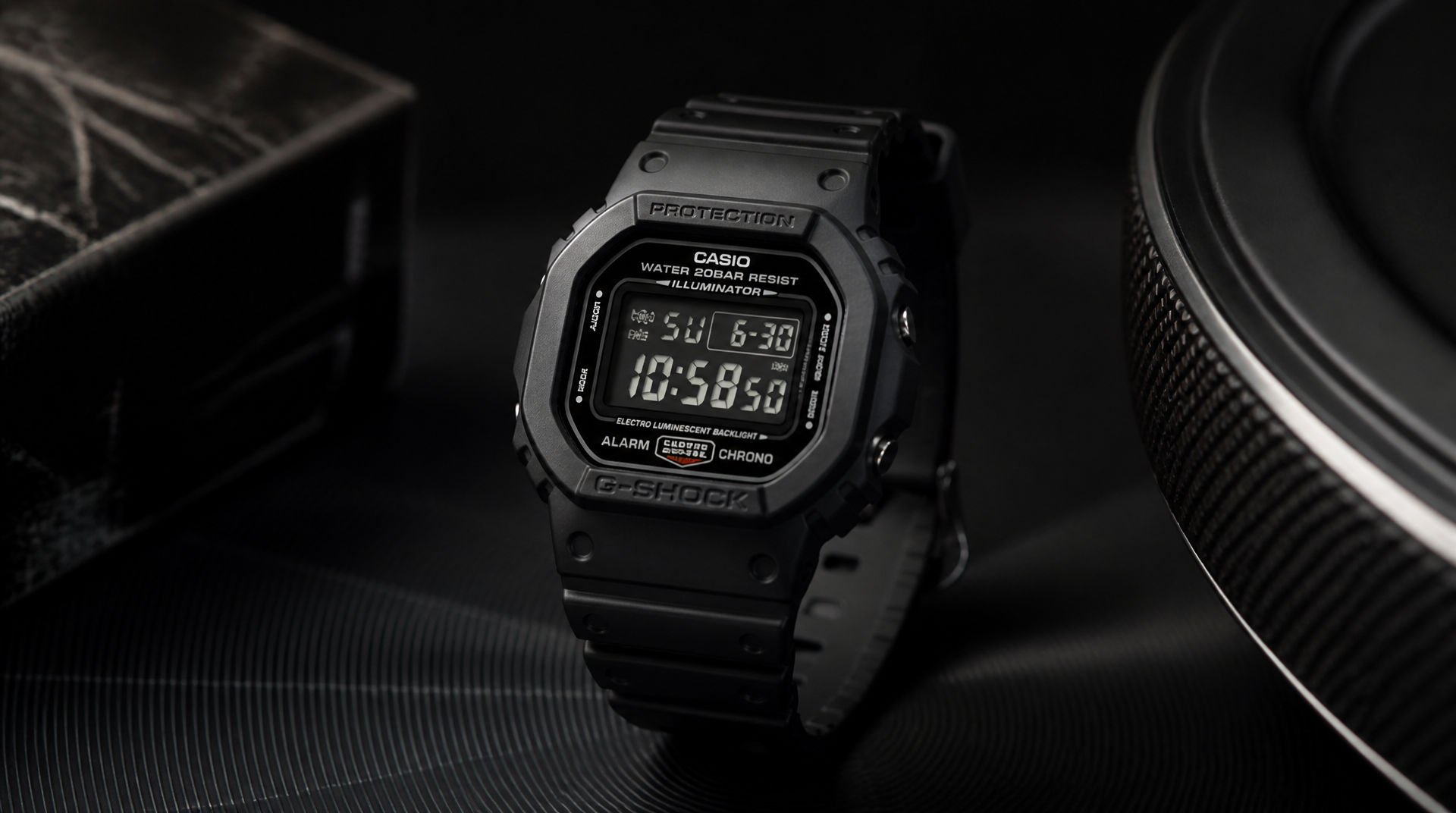
The DW-5600 is the everyman’s square G-Shock: the same digital layout and 200 m (656 ft) water resistance as the 1983 original, but built on a simplified resin caseback that keeps the price under $50. If you need a watch that survives drops, stays readable without a charging cable, and never nags you with notifications, this remains the benchmark. This guide breaks down the current lineup, the backlight-and-display traps that disappoint new buyers, and a repeatable decision flow so you land the right square the first time.
How the DW-5600 Became the Affordable Square Icon
The first G-Shock square—the DW-5000C—shipped in 1983 with a full-metal screw-down caseback, a stainless steel inner case, and a made-in-Japan build that collectors still pay a premium for today. Casio wanted a version that preserved the shock structure and the asymmetric octagonal silhouette without the same production cost. The DW-5600 arrived in 1996 with a stamped caseback, a resin battery hatch, and a pared-down module (Module 1545, later revised to 3229). That change cut the retail price roughly in half and gave the square G-Shock a permanent entry point for buyers who cared about toughness over metalwork.
The brand had already proven it could stretch beyond the digital-only formula. In 1989 the AW-500 series showed that G-Shock could blend analog hands with a digital display without sacrificing impact resistance. The DW-5600 represented the other side of that expansion: a pure digital platform that left out the metal chassis and extra hands, focusing entirely on the core shock-protected module, mineral glass, and recessed buttons. As a result, the DW-5600 became the square that most people picture when someone says “G-Shock.”
Current DW-5600 Lineup at a Glance
The DW-5600 family isn’t one watch. Subtle differences in module, backlight technology, display polarity, and power source split the range into models that suit very different usage patterns. The table below covers the core variants you’ll find in stores today, not an exhaustive catalog of limited editions.
| Model | Module (approx.) | Display | Backlight | Power | What it changes |
|---|---|---|---|---|---|
| DW-5600E-1V | 3229 | Positive (dark on light) | EL (blue-green electroluminescent) | CR2016, ~2 years | The classic affordable square; soft, even glow |
| DW-5600BB-1 | 3525 | Negative (light on dark) | EL (blue-green) | CR2016, ~2 years | Stealth blacked-out look; digits wash out in dim light |
| DW-5600MS-1 | 3240 | Positive | EL | CR2016, ~2 years | Military-inspired red accents; same legibility as the E-1V |
| DW-5600HR-1 | 3229 | Positive | EL | CR2016, ~2 years | Nylon/fabric strap with hook-and-loop closure; lighter on wrist |
| G-5600E-1 | 3194 | Positive | EL | Tough Solar + CTL1616 rechargeable cell | No battery swaps; solar panel ring around the display |
| GM-5600-1 | 3461 | Positive | Super Illuminator LED (blue-white) | CR2016, ~2 years | Metal bezel over resin core; bright, even backlight |
| GM-5600B-3 | 3461 | Negative | Super Illuminator LED | CR2016, ~2 years | Olive green metal bezel, negative display; LED partly offsets the readability trade-off |
Where this guide applies—and where it doesn’t. The advice that follows focuses on the mainstream models listed in the table. If you’re hunting a vintage piece, a limited-edition collaboration, or a 30th-anniversary square, the module, backlight, and even the lug width can differ. Older DW-5600 models using Module 1545 may lack the flash-alert function, and an aged EL panel will be noticeably dimmer than a fresh one. The easiest way to confirm which feature set you’re buying is to check the four-digit module code stamped on the caseback. If the listing doesn’t show the caseback clearly, treat it as a red flag—you cannot verify the watch matches the seller’s description without that photo.
The DW-5600 Variant Trap: Avoid Ordering the Wrong Square
The most common buyer frustration with a new DW-5600 isn’t a defect; it’s a mismatch between the chosen display-backlight combination and the user’s daily environment. The classic failure works like this: you pick a DW-5600BB because the all-black face looks killer in product photos. After a week of wear, you realize you cannot read the time at a glance unless you press the light button, and even then the soft EL panel leaves the edges of the LCD dim.
You wake up at 5:30 a.m., hit the light to check the alarm indicator, and the glow is too faint to see whether the bell icon is on—so you fumble for the button again, which wakes your partner. Meanwhile, a DW-5600E-1V at the same price would have shown the time instantly in almost any light, without needing the backlight at all.
How to catch the mismatch before you buy:
1. Search the model number plus “backlight” on video platforms. Look for wrist-roll footage shot in ordinary indoor lighting, not in a studio. If the backlight looks dim and uneven in those clips, that’s what you’ll get in daily use.
2. Check the backlight spec on the product page. “EL backlight” or “electroluminescent” means the softer, blue-green glow. “Super Illuminator” or “LED backlight” is the brighter, instant-on white/blue light found in GM-5600 models.
3. Inspect dial shots for the solar panel pattern. If you see faint striped outlines around the digits, the watch is a G-5600E (Tough Solar). That identification lets you prioritize charging convenience over backlight type—or rule it out if you dislike the look.
4. Test the negative-display verdict. If you can’t handle a watch in person, seek out wrist shots captured in indirect indoor light. When the numerals look ghosted or faint against the dark background, expect the same experience on your own wrist. For a single-watch daily beater, default to a positive display unless you are willing to rely on the backlight for every low-light reading.
On a new DW-5600, you can confirm the backlight type instantly in a completely dark room: press the light button and note the color and ramp-up. A soft, bluish-green glow that takes roughly half a second to reach full brightness is the EL panel. An instant, bright white/blue beam that floods the whole display evenly is the Super Illuminator LED. This is the single most reliable field check, and it determines whether the watch works for you after sunset.
How to Pick the Right DW-5600 for Your Wrist
Most buyers end up comparing a battery-powered positive square (DW-5600E-1V) against a solar-powered model (G-5600E). The flow below works for a first-time G-Shock buyer, a collector looking for a daily beater, or someone who has already been burned by a dim display.
Early Checkpoints
Checkpoint 1: Battery-change tolerance. Swapping a CR2016 every two years takes about five minutes with a small Phillips screwdriver and a dab of silicone grease to keep the O-ring sealed. If you’re fine with that, any standard DW-5600 works. If you want to set the watch and forget it for a decade, narrow your search to the G-5600E. However, note that solar without atomic radio means you’ll still manually adjust the time every few months. The GW-M5610U combines Tough Solar and Multi-Band 6, but it sits in a higher price bracket.
Checkpoint 2: Backlight demands. For offices and well-lit rooms, the classic EL backlight is acceptable. For dark garages, night walks, or movie theaters, the Super Illuminator LED in the GM-5600 line is a meaningful upgrade. A standard DW-5600E with a positive display often lets you read the time without using the light at all, which removes much of the backlight problem.
Checkpoint 3: Display polarity under real light. Positive (dark digits on light background) performs in nearly every condition; it’s the safe default. Negative (light digits on dark background) looks sharp in direct sun but becomes hard to read under office fluorescents or at dusk. If you’re committed to the muted aesthetic, pick a model with LED backlight (e.g., GM-5600B) to compensate. Even then, test it during your return window with the kind of dim lighting you actually live with.
Ordered Steps
1. Shortlist three models from the table above: one battery-positive, one solar-positive, and one GM metal-bezel if your budget allows.
2. Watch at least two wrist-roll videos per model, noting how the display performs as the camera passes through shadows. Static studio shots hide the washout that shows up in real movement.
3. Eliminate any model whose backlight looks unusable in those videos. Do not assume your eyes will adapt; EL-powered negative displays create genuine frustration for a wearer who needs a quick glance in low light.
4. Check the strap hardware in the listing photos. Most DW-5600 models use a 16 mm pin-buckle resin strap. The DW-5600HR adds a fabric band, which saves weight and breathes better in hot weather. If you plan to install a NATO strap, recognize the trade-off up front: the 16 mm lugs require adapter pieces, and low-cost metal adapters can scratch the resin case or rattle. Loose adapter screws can let the spring bar escape, dropping the watch off your wrist.
5. Verify the module code on the caseback photo of the exact unit you’re buying—especially on marketplace listings. The code will read “3229,” “3525,” “3194,” “3461,” etc. Match it to the module column in the table to confirm the feature set.
6. Do the at-home test immediately. Set the time, press the light in a pitch-dark room, and confirm the backlight type and brightness. Press all four buttons; genuine DW-5600 buttons feel recessed and firm. Mushiness or a backlight that looks obviously different from the videos you studied suggests a counterfeit or a damaged seal.
Success signal: You can read the time without tilting your wrist under your typical overhead lighting, and the backlight illuminates every digit cleanly in a completely dark hallway. If either check fails, exchange the watch before the return window closes.
Escalation path: If the DW-5600 still feels too small or you need more features, the GW-M5610U adds Multi-Band 6 atomic timekeeping and Tough Solar in the same-sized case for roughly $50 more. That’s the natural next step, not a rabbit hole of limited-edition DW-5600 variants.
When the DW-5600 Isn’t the Answer
The square DW-5600 is a reference, not a universal solution. Walk away from this line when:
- You need automatic time sync. No DW-5600 has Multi-Band 6, Bluetooth, or GPS correction. For a set-and-forget square, look at the GW-M5610U (solar atomic) or the GMW-B5000 series (metal case, Bluetooth, and Tough Solar).
- Heavy strap customization is a must. The 16 mm lugs force you into adapter ecosystems that add bulk and introduce points of failure. If you want a NATO strap that fits natively, a GD-350 or a GA-2100 series model will serve you better. For a full metal bracelet conversion, skip the base DW-5600 entirely and start with a GM-5600 or GMW-B5000, which are engineered for a heavier strap without stressing the lug holes.
- You cannot tolerate a negative display in any form. Even with an LED backlight, negative LCDs struggle in transitional light. The GBD-200 uses a memory-in-pixel (MIP) display that stays legible without a backlight, but it swaps the classic digital G-Shock layout for a more fitness-tracker-like screen. If absolute readability ranks above heritage, that’s the smarter buy.
FAQ
Is the DW-5600 still worth buying now?
Yes, if you want a pure digital watch that tells time, runs a stopwatch, counts down, and sounds an alarm without ever needing a charge cable or software update. The standard DW-5600E-1V costs roughly $40–$50, and the battery can be replaced at home with a CR2016 cell and a small screwdriver. Just accept that it won’t sync time or track steps.
What separates a DW-5600 from a G-5600E?
The G-5600E uses Tough Solar charging, so it runs on light and stores energy in a rechargeable cell. It does not include Multi-Band 6 atomic reception and will not self-correct. Visually, you’ll see a solar panel strip around the LCD. If you dislike battery swaps, the G-5600E is the natural step up; if you also want automatic time correction, you need a GW-M5610U.
Can I fit a NATO strap or a metal bracelet?
Yes, but only with third-party adapters that convert the 16 mm lugs to a standard 20 mm or 22 mm width. Low-cost metal adapters can scratch the resin case and rattle, and the tiny screws can work loose over time, risking a lost spring bar. Thread-locking compound helps, but the setup is never as solid as a watch with native wide lugs. Full metal bracelet kits exist for the GMW-B5000 line; forcing one onto a base DW-5600 adds weight the resin lugs were not designed for and may prematurely wear the spring-bar holes.
Is the negative display really that hard to read?
It’s not defective—it’s designed for style over accessibility. Under direct sun the contrast can look deep, but under typical office lighting or inside a car at dusk the digits often fade to a dark gray. If you must have a blacked-out look, buy a GM-5600B with the LED backlight and order a positive-display square as a backup if daily legibility becomes an irritation. The safest way to test is to view a negative square in person with the ambient light you’ll actually wear it in, rather than relying on press photos.
Explore This Topic
- Back to Casio
- Back to G-Shock Guide
Related guides in this cluster:
- Seiko Alpinist SARB017 Guide: The Complete Collector’s Reference
- Rolex Submariner Guide: Every Generation, Reference Number & Buying Advice
- Breitling Watch Buying Guide: Are They Worth It in 2026?

The We Know Watches editorial team brings together over 40 years of combined watch collecting, trading, and repair experience. Our editors have owned and handled watches from every major brand — from entry-level Seiko 5s to Rolex, Omega, Patek Philippe, and independent Swiss watchmakers. We’ve bought and sold at auction, worked with authorized dealers, visited manufacturing facilities in Switzerland and Japan, and serviced hundreds of movements ranging from the Seiko 7S26 to the Longines L888. Every guide and review we publish is based on hands-on experience, original research, and consultation with professional watchmakers. We do not accept payment for reviews, and we clearly disclose when we use affiliate links.