
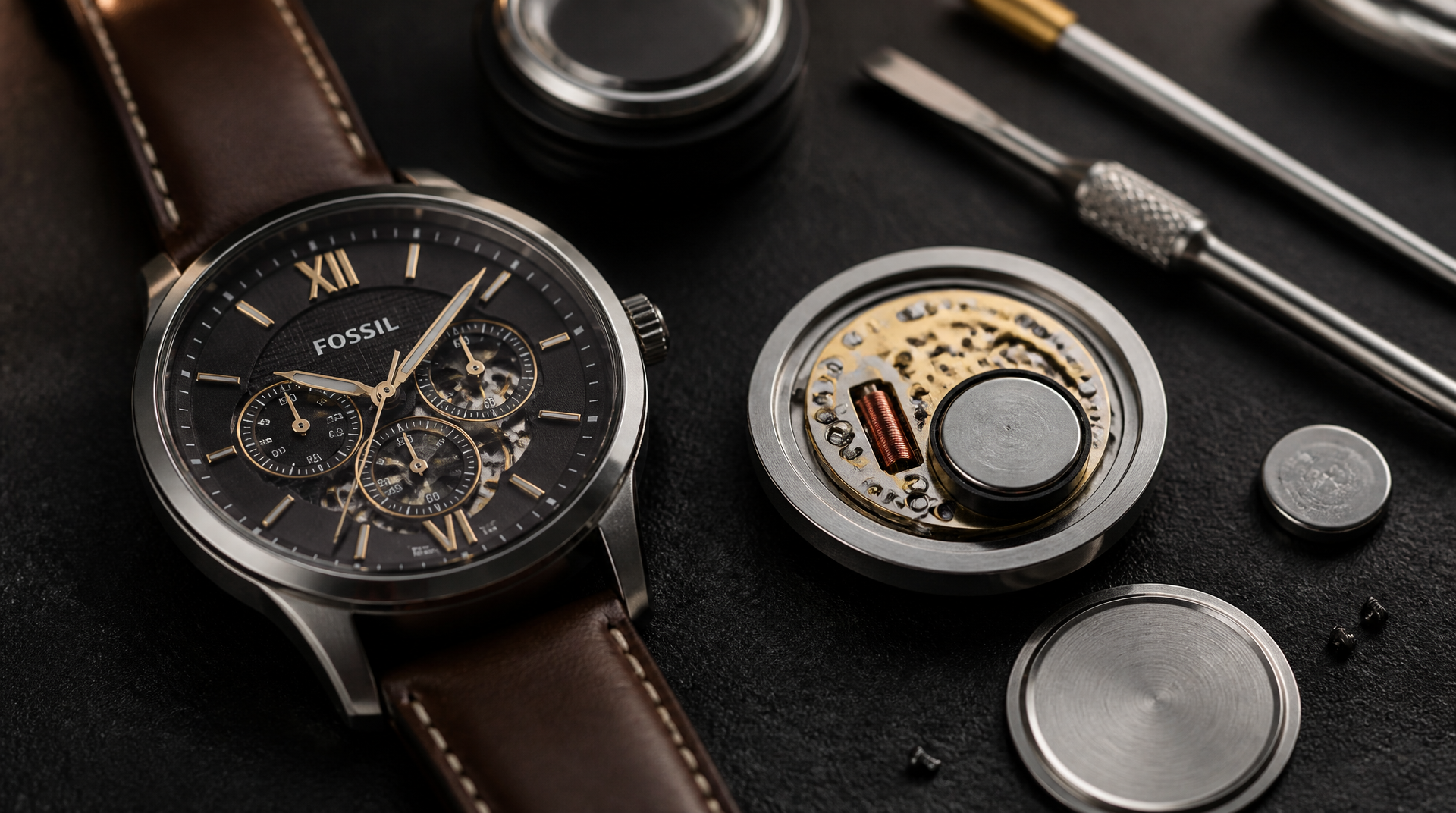
Replacing a Fossil watch battery is a manageable do-it-yourself job when you match the correct button cell, work with a few simple tools, and treat the water-resistant seal with care. Most Fossil quartz models take a standard silver-oxide or lithium coin cell; the exact number is usually stamped on the old battery or the case back. This guide gets you the right battery reference, walks you through safe case back removal, the cell swap, and re-sealing, and shows you when the smarter move is handing the watch to a professional.
Which Battery Fits Your Fossil Watch?
Before you touch a case wrench, confirm the exact battery reference. The safest route is to open the watch and read the number printed on the old battery. If you want to buy the replacement first, these are the most common matches across Fossil’s quartz line. Always choose silver-oxide (SR) cells over alkaline (LR) equivalents—silver-oxide delivers a steadier voltage and longer life.
| Fossil Watch Family | Typical Battery (Silver-Oxide) | Lithium Alternative / Chronograph |
|---|---|---|
| Jacqueline, Carlie, Georgia (most women’s three-hand) | SR621SW (377) | – |
| Townsman, Machine, Dean (most men’s three-hand) | SR626SW (373) | – |
| Grant, Nate, Coachman (three-hand + date) | SR626SW or SR927SW | – |
| Grant Chronograph, Nate Chronograph, Neutra Chronograph | SR927SW (395) | CR2016 |
| Fossil Hybrid HR / Hybrid Smartwatch | CR2025 | – |
| Fossil Gen 5 / Gen 6 Touchscreen | – | Internal rechargeable; not user-replaceable without specialist kit |
If your model isn’t listed, check the case back engraving—many Fossil watches print “BATTERY: SR626SW” or similar directly on the metal. When you see no marking, look at the movement number under the old battery (such as “JR1005” or “VD53”) and search that reference for the correct cell. Fossil’s own parts diagrams also list battery numbers, and you can match those.
Tools You’ll Need (and What You Already Have)
A clean, well-lit work surface and a handful of tools make the job predictable. You don’t need a watchmaker’s bench, but the right items dramatically lower the chance of scratching the case or mangling the gasket.
- Case back opener – A three-point adjustable case wrench for screw-down backs; a thin case knife or pry tool for snap-on backs. A dull butter knife can work in an emergency for snap backs, but it raises the slip-and-scratch risk significantly.
- Non-metal tweezers – Plastic or ceramic-tipped tweezers let you handle the new battery without shorting it or leaving skin oils that promote micro-corrosion.
- Dust blower or canned air – For clearing debris from the movement before closing.
- Soft cloth or watchmaker’s mat – Protects the crystal when the watch is face-down.
- Silicone grease (optional but recommended) – A tiny dab on the case back gasket after cleaning helps maintain water resistance.
- Magnifier – A loupe or strong reading glasses to read the battery number and inspect the gasket.
Start Here: Is the Battery Really Dead?
A dead battery is the most common cause of a stopped Fossil, but not the only one. Spend 30 seconds on these checks before you open the case. It saves time and avoids a battery swap that doesn’t fix anything.
- Crown not fully pushed in. If the crown is pulled out even one click, many Fossil quartz movements cut power. Push the crown firmly until it sits flush against the case. If the watch starts ticking, you’ve solved a “dead battery” without opening it—keep the crown fully seated and you’re done. If the watch remains still, you’re clear to move on.
- Physical shock or moisture. Did the watch stop right after a hard knock or exposure to water? A stuck gear or moisture on the circuit board can mimic a dead battery. In those cases a new battery won’t help—you need movement-level inspection.
- Watch in hibernation mode. Some Fossil Hybrid HR models enter a deep-sleep mode when the battery is critically low. Before replacing the CR2025, try pressing the middle button once. If the screen flickers or hands move, a fresh battery is likely the answer; if nothing happens after a reset attempt, the battery or internal contacts may be the issue.
What to do next: If the crown push revived the watch, no tools are needed. If the watch is dead with the crown correctly seated and there’s no sign of a recent impact or water intrusion, odds are high the battery is drained—proceed to open the case.
Opening the Case Back Safely
Fossil uses two main case-back types: snap-on (press-fit) and screw-down (threaded ring with notches). Identify yours before you apply force.
Snap-On Case Back
1. Place the watch face-down on your soft cloth.
2. Find the small raised lip, usually opposite the crown, between the case and the case back. Some Fossil snap backs have a subtle half-moon cutout that the case knife tip can nestle into.
3. Slide the edge of your case knife into the lip and, holding the knife flat against the case, twist gently. The lid should pop up. Do not pry against the crystal or force the knife at a steep angle—that bends the case and can crack the crystal.
4. Lift the case back away and set it aside.
Stop point: If the lip is extremely tight and the knife keeps slipping, stop. A watch shop can open it in seconds with a proper press tool. Exerting uncontrolled force often gouges the case or slices the gasket.
Screw-Down Case Back
1. Adjust your case wrench so the three pins or tips engage the notches in the case back. Tighten the lock so the wrench doesn’t slip.
2. Hold the watch steady with your free hand and turn the wrench counterclockwise. Screw-down backs sometimes have a small amount of thread locker; you may feel a soft snap as it breaks loose—that’s normal.
3. Once loose, unscrew the back and lift it off. Keep the thin O-ring or flat gasket seated in the case or on the lid; note exactly where it sits.
If the back won’t budge with firm, controlled pressure, stop. Forcing it risks cross-threading or cracking the gasket seat. A jeweler can use a bench-mounted opener without damaging the threads.
Removing the Old Battery and Installing the New One
With the case back off, you’re looking at the movement and a shiny button cell. Before touching the battery, make two critical inspections because what you see now changes everything that follows.
- Inspect the gasket and inside for moisture. If the rubber O-ring or flat seal is torn, nicked, or stretched, do not reassemble without a replacement—the watch will lose water resistance immediately. If you spot even a tiny droplet of water or fog on the underside of the crystal, stop right here. Water inside means the movement needs professional drying and cleaning; a new battery will short out and ruin the circuit board.
- Check the plastic insulator ring. Many Fossil quartz movements have a thin white plastic ring around the battery cavity. If that ring is cracked or missing, the new battery will short against the metal movement holder the moment you install it. You need a proper insulator before proceeding, or the repair moves beyond a simple battery swap.
If everything looks dry and intact, move to the battery swap.
1. Note the orientation before you remove anything. Take a clear phone photo. Most Fossil quartz movements place the battery positive (+) side facing up, but some chronograph modules run it positive-side down. Copy what you see.
2. Use plastic or ceramic-tipped tweezers to gently lift the old battery out of its holder. There is usually a small metal retaining spring or clip; don’t bend it out of shape—just nudge it slightly to free the cell.
3. Handle the new battery by its edges only. Skin oils and moisture cause micro-corrosion. Never use metal tweezers; they can create a momentary short and partially drain a fresh cell.
4. Place the new battery into the holder with the same orientation as the old one, then gently press it until it seats flat. The retaining clip should snap lightly into place without forcing.
5. Check that the movement starts ticking right away. Look for the seconds hand moving. If it doesn’t start, you may need a manual reset (described in the troubleshooting section).
Critical corrosion stop point: If the old battery shows any white crust, green discoloration, or leakage, do not simply drop in a new battery and close the watch. That corrosion has already migrated onto the movement contacts. Cleaning it requires removing the movement and using a specialized solvent. This is your permanent stop: take the watch to a professional to prevent circuit board damage that turns a simple battery swap into a dead watch.
Sealing the Watch for Daily Wear
Water resistance depends entirely on how you re-seal the watch. Treat the gasket like a single-use part; inspect it every time.
1. Before closing, examine the case back gasket once more. It must be clean, undamaged, and free of lint. Even a single hair can compromise the seal. If the gasket is missing, torn, or stretched, stop and source a proper replacement. Generic multi-packs rarely fit Fossil cases correctly; order one specific to your model or let a professional supply it.
2. If you have silicone grease and the gasket is intact, apply a very small dab to a fingertip or toothpick and lightly coat the gasket. This keeps it supple and helps it seat without rolling or pinching.
3. Snap-on backs: Position the lid over the case, align the lip with the opening, and press down firmly with both thumbs. A satisfying click usually signals it’s seated. Then run your fingertip around the rim to feel for any gap. An uneven gap means the gasket is pinched; reopen and reseat.
4. Screw-down backs: Start threading by hand clockwise, turning gently until you feel no resistance. Then use the case wrench to tighten without over-torquing. Stop when the back is flush with the case and the wrench meets firm resistance. Over-tightening crushes the gasket and makes future removal a struggle.
Did It Work? A 30-Second Success Check
Before you consider the job finished, confirm that your work paid off with a brief series of checks.
- Seconds hand running: Hold the watch to your ear—you should hear a faint, steady tick. Watch the seconds hand for a full minute; if it moves without hesitation, the movement is awake and the battery is correctly seated. On a chronograph model, check that the main seconds hand and subdials are all moving normally.
- Digital display (Hybrid HR): The e-ink screen should show the time or activity data within a few seconds. For a freshly installed CR2025, the hands may perform an automatic calibration run (spinning to 12:00, then to the correct time) after a sync; if you see that, the battery and connection are solid. If the display remains blank but you feel a short vibration, the battery is making contact—proceed to the app sync.
- Crown and pushers: Pull the crown and rotate the hands; everything should feel smooth. Press each chronograph pusher—they should click cleanly and start/stop the chronograph hand without sticking.
If the watch passes all checks, you’re done—the new battery is seated and the case is closed correctly. If the seconds hand stays still or the display remains blank, move to the next section before assuming the worst.
When a New Battery Doesn’t Bring the Watch to Life
A silent Fossil after a battery change usually isn’t a disaster. Work through these checks in order, and pay attention to how the watch reacts—it tells you where to go next.
- Battery orientation. Re-check against your photo. A battery installed upside-down won’t power the movement, but it rarely causes permanent damage. Flip it and try again.
- AC reset. Many Fossil quartz movements need a circuit reset after a battery change. Pull the crown to the time-setting position, wait 10 seconds, then push it back in firmly. On chronograph models, pull the crown to the second click, press and hold both pushers for 2–3 seconds to reset the circuit, then push the crown back in. If your Fossil uses a Miyota 2035 or similar movement, you may see an “AC” contact point on the circuit board—briefly shorting it to the battery positive with metal tweezers for about two seconds forces a hard reset. Use this only if the standard reset fails, and avoid touching other circuit traces.
- Crown not fully seated. If the crown is even slightly pulled out, the movement may cut power. Push it in until it sits flush.
- Broken insulator or contact damage. If the battery is oriented correctly, the crown is seated, and a second fresh cell still gives no life, the coil or circuit board is likely damaged. This often follows physical shock, previous corrosion, or a botched battery change. At that point you need a movement-level inspection.
- Hybrid smartwatch sync. After a CR2025 swap in a Fossil Hybrid HR, the hands may re-set but time could drift. Open the Fossil Smartwatches app and perform a re-sync and hand calibration. If the watch won’t enter pairing mode, check that the battery makes solid contact and that the internal reset button isn’t stuck. A watch that buzzes but won’t display anything usually responds to a hard reset: find the tiny pinhole button near the battery, press it with a non-conductive tool for 5 seconds, and try pairing again.
If any step brings the watch back to life, close the case and run the success check. If nothing works after a second new battery from a sealed pack, the fault is almost certainly internal, and you are better off stopping than chasing an electronics repair you cannot confirm without a test bench.
When to Hand It to a Watchmaker
Self-service ends the moment you risk stripping threads, cracking a crystal, or writing off a movement. Stop and visit a jeweler or Fossil service center in any of these situations:
- The case back won’t open with controlled force. Overpowering a tool can permanently deform the case.
- You see any sign of battery leakage, greenish corrosion, or water droplets inside. Cleaning that safely requires ultrasonic equipment and a new insulator; a “wipe and hope” fix invites worse damage later.
- The gasket is torn, stretched, or missing and you don’t have a model-specific replacement. A compromised seal will let moisture in, fog the crystal, and rust internal parts.
- The watch is a hybrid smartwatch or Gen 5/Gen 6 touchscreen that won’t boot after a CR2025 swap and hard reset. These often need re-seating of internal antenna connectors with a proprietary tool. The cost of a professional service is far less than a dead mainboard.
- The movement shows no life after a correct battery, AC reset, and a second new cell. There’s a mechanical or electronic fault beyond a simple battery swap.
One important decision criterion changes the recommendation when your situation is different: if you regularly wear the watch while swimming, showering, or in humid conditions, have a professional do the battery change and pressure test the seal. A home repair cannot verify water resistance, and even a perfectly seated gasket can fail if a microscopic tear goes unnoticed. For a casual daily watch that stays dry, a careful DIY swap works well—so long as you accept the small risk of a compromised seal. Fossil service centers and most independent watchmakers can replace the battery, test the circuit, and pressure-test the case for roughly the cost of a dedicated case wrench and a few trial batteries. When your watch matters more than the few dollars saved, that peace of mind is the stronger choice.
Explore This Topic
- Back to Fossil
- Back to Fossil Battery Help
Related guides in this cluster:
- Hamilton Pocket Watch Collector’s Guide: Serial Numbers, Models & Value
- Citizen Eco-Drive Complete Guide: Setting Time, Battery Life & Care
- Breitling Watch Buying Guide: Are They Worth It in 2026?

The We Know Watches editorial team brings together over 40 years of combined watch collecting, trading, and repair experience. Our editors have owned and handled watches from every major brand — from entry-level Seiko 5s to Rolex, Omega, Patek Philippe, and independent Swiss watchmakers. We’ve bought and sold at auction, worked with authorized dealers, visited manufacturing facilities in Switzerland and Japan, and serviced hundreds of movements ranging from the Seiko 7S26 to the Longines L888. Every guide and review we publish is based on hands-on experience, original research, and consultation with professional watchmakers. We do not accept payment for reviews, and we clearly disclose when we use affiliate links.